¶ Degrees of Freedom
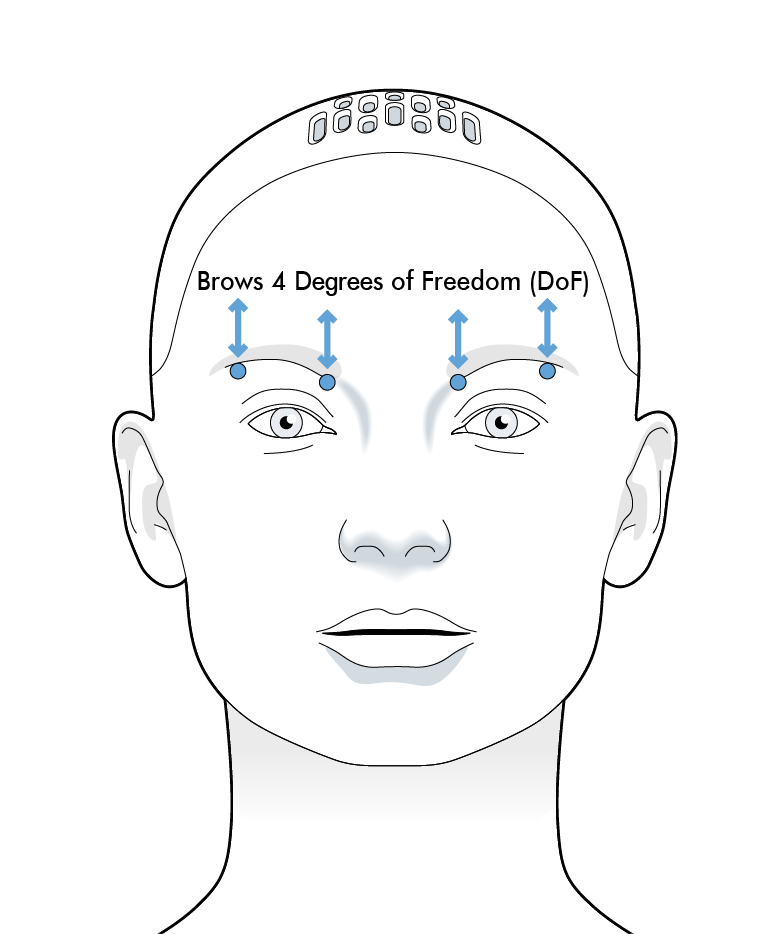
Each eyebrow has two degrees of freedom:
- brow inner (the end of the eyebrow closes to the face centreline)
- brow outer (the end of the eyebrow furthest from the face centreline)
These are normalised degrees of freedom, meaning their position value controls are between [0,1].
For the brows, a position value of 1 translates to raised eyebrows and a position value of 0 is scrunched.
¶ Control API
The actual position of the module can be accessed using controls.
Controls are accessed with the notation :
my_control = system.control(Control_name, Namespace, acquire = Parameters)
Below is an example of finding the relative position of the outer right brow and then making it rise.
#get access to the control
brow_outer_right_control = system.control(
    "Brow Outer Right", "Mesmer Brows 1", acquire=["demand","position"]
)

class Activity:
    def on_start(self):
    	#find the eyebrow position
      current_eyebrow_position = brow_outer_right_control.position
      print(current_eyebrow_position)
    	#raise the eyebrow
    	brow_outer_right_control.demand = 1
The on_tick method can be used for more powerful, time varying demands.
A more complete tutorial on controls is given here.
¶ Control parameters:
| Control name | Namespace | Avaliable parameters |
|---|---|---|
"Brow Inner Left" |
"Mesmer Brows 1" |
["demand","position","min","max","enable","status"] |
"Brow Inner Right" |
"Mesmer Brows 1" |
["demand","position","min","max","enable","status"] |
"Brow Outer Left" |
"Mesmer Brows 1" |
["demand","position","min","max","enable","status"] |
"Brow Outer Right" |
"Mesmer Brows 1" |
["demand","position","min","max","enable","status"] |
The control_name, namespace and avaliable parameters for each control is given in the control section of the scripts page in Tritium UI, this gives more information about datatypes and access rights.