¶ Movement
¶ Degrees of Freedom
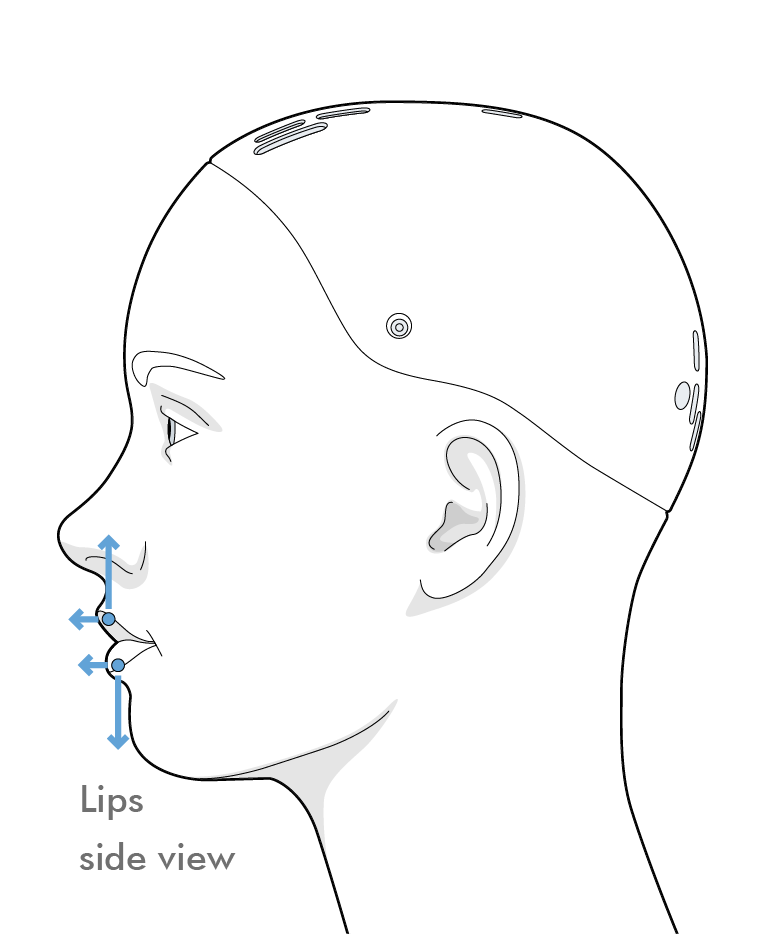
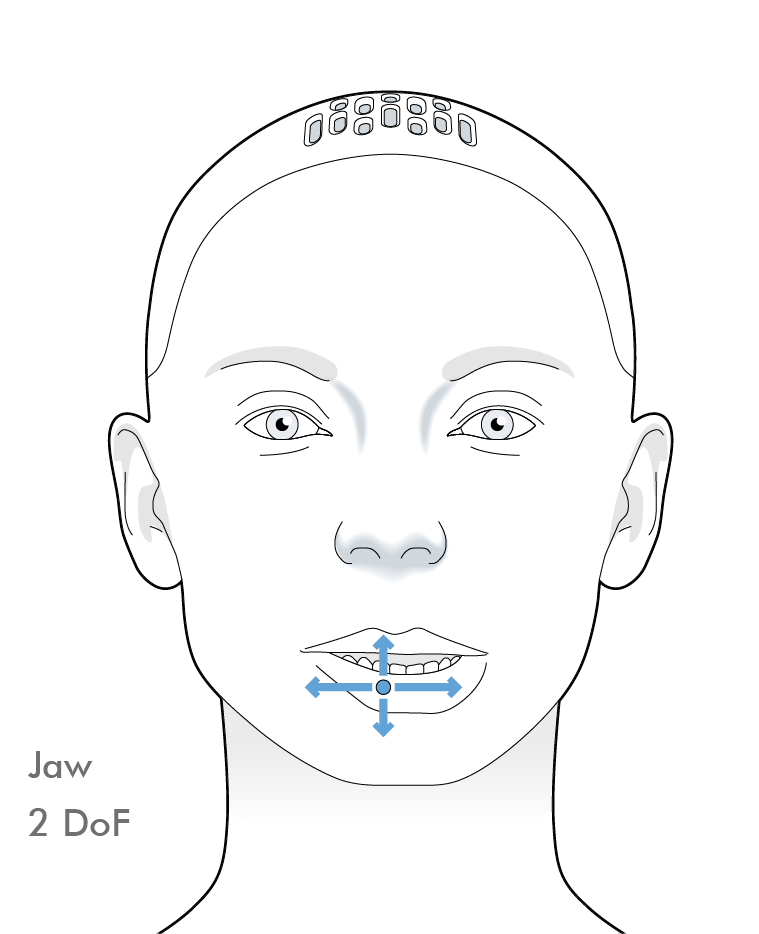
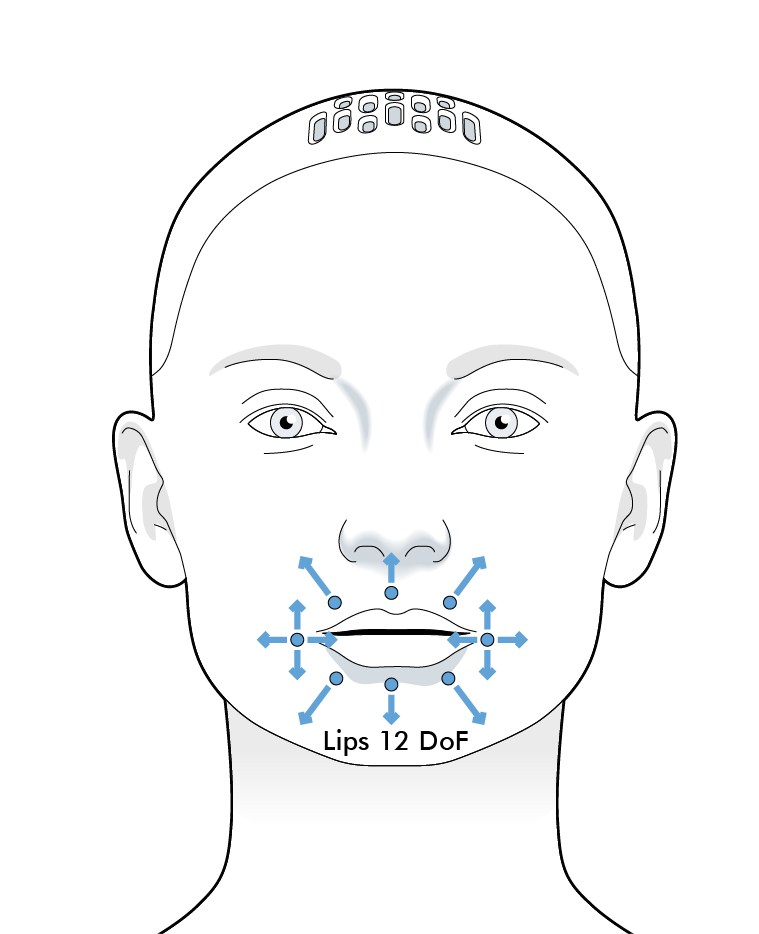
The lips have 12 degrees of freedom, with a further 2 in the jaw for a total of 14 degrees of freedom related to the mouth.
Each of these degrees of freedom is controlled according to a normalised scale, i.e. in a range between 0 and 1.
Jaw Range Limis
The jaw cannot reach both maximum yaw and maximum pitch at the same time.In cases where a combination of jaw yaw and pitch motions outside the achievable range are requested, the pitch demand is prioritised, and the yaw motion is limited to the maximum achievable displacement at the specified pitch displacement.
The following diagrams indicate the names, locations and direction convention for each of the lip and jaw axes
¶ Poses
Preset combinations of lip and jaw positions are stored as poses, allowing quick access to convincing and emotive facial positions.
¶ Control API
The actual position of the module can be accessed using controls.
Controls are accessed with the notation :
my_control = system.control(Control_name, Namespace, acquire = Parameters)
Below is an example of finding the curl of the top lip before making it curl upwards.
#get access to the control
top_lip_curl_control = system.control(
    "Lip Top Curl", None, acquire=["demand","position"]
)

class Activity:
    def on_start(self):
    	#find the top lip curl
      current_top_lip_curl = top_lip_curl_control.position
      print(current_top_lip_curl)
    	#curl the top lip
    	top_lip_curl_control.demand = 1
The on_tick method can be used for more powerful, time varying demands.
A more complete tutorial on controls is given here.
¶ Control parameters:
The controls with only the "demand" parameter are a combination of multiple motors, meaning a 'meaningful' position cannot be read.
The parameters: error, status and status2 represent the module's readieness to perform actions. Information on these parameters can be found in the devices tab in Tritium UI, by examining the selected parameters.
| Control name | Namespace | Avaliable parameters |
|---|---|---|
"Lip Bottom Curl" |
None |
["enable","error","demand","demand_real","position","min","max","position_real", "lower_limit","upper_limit","status","abs_flag"] |
"Lip Bottom Depress Left" |
None |
["enable","status","demand","position","min","max","status2"] |
"Lip Bottom Depress Middle" |
None |
["enable","status","demand","demand_real","position","min","max","position_real", "lower_limit","upper_limit","status","abs_flag"] |
"Lip Bottom Depress Right" |
None |
["enable","status","demand","position","min","max"] |
"Lip Corner Raise Left" |
None |
["demand"] |
"Lip Corner Raise Right" |
None |
["demand"] |
"Lip Corner Stretch Left" |
None |
["demand"] |
"Lip Corner Stretch Right" |
None |
["demand"] |
"Lip Top Curl" |
None |
["enable","error","demand","demand_real","position","min","max","position_real", "lower_limit","upper_limit","status","abs_flag"] |
"Lip Top Raise Left" |
None |
["enable","status","demand","position","min","max"] |
"Lip Top Raise Middle" |
None |
["enable","status","demand","demand_real","position","min","max","position_real", "lower_limit","upper_limit"] |
"Lip Top Raise Right" |
None |
["enable","status","demand","position","min","max"] |
"Jaw Pitch" |
None |
["demand"] |
"Jaw Yaw" |
"Mesmer Mouth 2" |
["demand","position"] |
The control_name, namespace and avaliable parameters for each control is given in the control section of the scripts page in Tritium UI, this gives more information about datatypes and access rights.
¶ Control parameter limits
Changing robot control parameter limits can do extreme damage to your robot and is potentially dangerous. Do not make changes without fully understanding what the parameter does and what the consequences may be.
| Control name | Namespace | Avaliable parameters |
|---|---|---|
"Lip Bottom Curl Limits" |
None |
["norm_lower_limit","norm_upper_limit"] |
"Lip Bottom Depress Middle Limits" |
None |
["norm_lower_limit","norm_upper_limit"] |
"Lip Top Curl Limits" |
None |
["norm_lower_limit","norm_upper_limit"] |
"Lip Top Raise Middle Limits" |
None |
["norm_lower_limit","norm_upper_limit"] |