¶ Non-live Software Issues and Requests
If you don't have access to Tritium UI, if you have a problem with the physical hardware or to ask us for help, please contact us. Please include as much information as possible.
¶ Live Software Issues
If you have an issue with the Tritium software platform that you're unable to solve, you can report the problem through the UI for one of our engineers will investigate.
On the right side of the topbar in Tritium UI you'll see a help dropdown. Select Report a Problem.
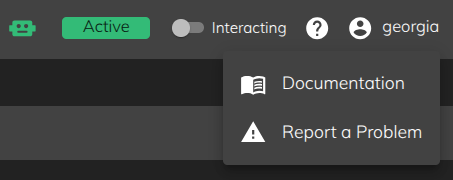
You will then be presented with a report dialog where you can report the problem:
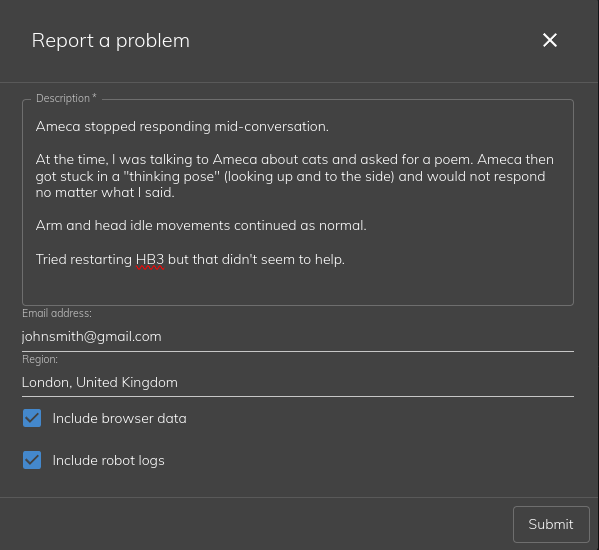
¶ Description
When reporting a problem, please be as detailed as possible.
-
What were you doing at the time when you noticed the problem?
-
What is/was the robot doing? Is it visibly frozen or doing idle behaviours?
-
What solutions have you tried already?
The more information we have, the more likely we will be able to recreate any possible bugs ourselves.
¶ Browser Data
This gives us information about the browser you are using to access the software e.g.
Mozilla/5.0 (X11; Linux x86_64) AppleWebKit/537.36 (KHTML, like Gecko) Chrome/120.0.0.0 Safari/537.36
If possible, have a look at the browser logs in the developer console by pressing
F12. Error logs can sometimes be found here that can provide us with valuable information.
¶ Robot Logs
This will include a compressed copy of all the available the logs on the connected robot along with your report. This can be extremely helpful for us to diagnose what went wrong at the system level.