¶ Robot Logs
The robot outputs logs containing information about both its hardware and software. Logs are categorized into standard levels: info, debug, warning, and error.
Robot logs are always in UTC.
Node Logs: Tritium node logs can be accessed via the System tab in Tritium UI.
Human Behavior Logs: Human Behaviour logs are available in the console on the Scripts tab in Tritium UI.
¶ Downloading Logs
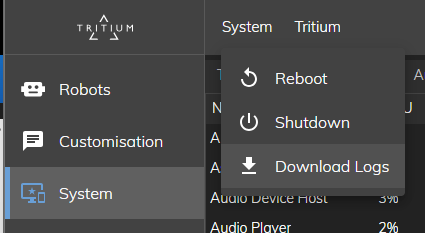
Logs can be downloaded from the top bar of the System tab in Tritium UI, labeled "System":
¶ Reporting Issues
If you encounter problems with the Tritium software platform that you are unable to resolve, please report the issue through the UI, and one of our engineers will investigate.
¶ Long-running log capture
UI downloads may be limited by disk space and can be overwritten during the day. For continuous remote log capture, see Tritium Remote (developer guide).