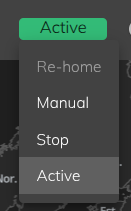
Your robot is always in one operating mode at a time. You can see the current mode in Tritium UI and from the colour of the head LEDs — see Head LEDs.
¶ Operating modes
| Mode | What it means | Head LED colour |
|---|---|---|
| Startup | The robot is starting up. Motors and systems are initialising. | Soft green |
| Active | Normal operation. Conversation, telepresence, and built-in behaviour are available. | Cool white |
| Manual | Direct pose and motor control only — for fine adjustment. No high-level autonomous behaviour. | Warm orange |
| Stopped | Motors are enabled for setup or maintenance. Most features are off. | Bright red |
¶ Changing mode
When connected to your robot in Tritium UI, open the System tab to view and change the operating mode where your software version allows it.
Interaction with visitors is only available in Active mode. If the robot leaves Active mode, Interaction is turned off automatically. See Interacting with your robot.
¶ Older software versions
Robots running Tritium 3.0 used slightly different mode names (for example Idle instead of Active). If your robot shows different labels, contact support or see the developer State Engine documentation for version-specific detail.