You configure your robot's audio through the System > Audio tab. This is where you select which speakers and microphones the robot uses.
¶ Output (speakers)
Output streams correspond to the speakers available on your robot. You can assign which speaker each audio source plays through.
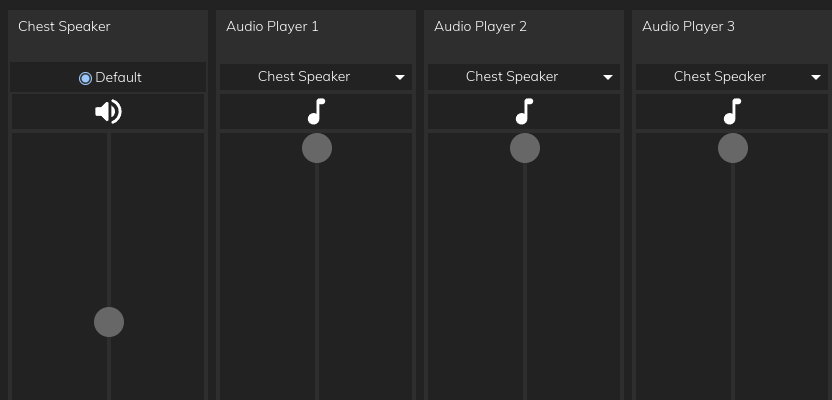
In the screenshot above:
- There is one speaker ("Chest Speaker") — your setup may have more.
- All audio players are assigned to the same speaker by default.
- You can change which speaker a source uses via its dropdown.
¶ Animation audio
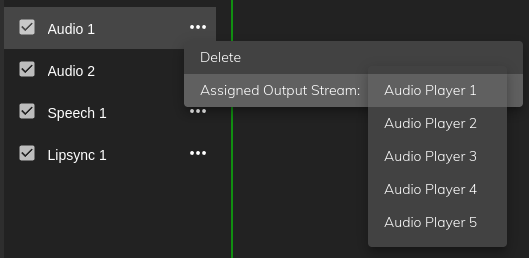
In Animator, individual audio tracks can be assigned to different output streams. This lets you route sounds from specific tracks to different speakers.
¶ Input (microphones)
Input streams correspond to the microphones available on your robot. Select the active microphone under System > Audio.
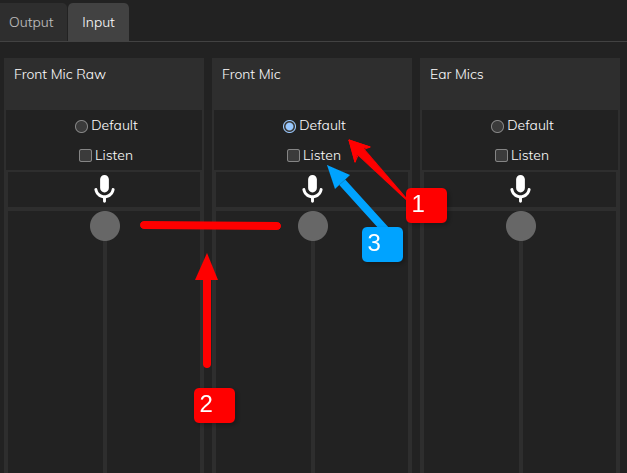
Typical sources:
- Front Mic — processed audio from the onboard chest mic (recommended default)
- Front Mic Raw — unprocessed audio from the same mic
- Ear Mics — legacy microphones in the head (not available on 2026 models)
¶ Initial setup
- Set "Front Mic" as the default input.
- Set both Front Mic Raw and Front Mic to a high level.
- To test: plug headphones into your laptop and tick "Listen" to hear the audio stream. If distorted, reduce the level.
¶ External audio
- Mesmer Desktop Gen 3 — 3.5 mm jack and docking station: External Audio Devices — Desktop Gen 3
- Desktop Gen 2 and full-size robots — USB microphones, interfaces, and line output: External Audio Devices
¶ Developer audio documentation
For technical details on PulseAudio, audio nodes, system scripts, and streaming, see the developer audio page.